TL;DR
Shapefiles suit one person working on one layer, and a GeoPackage suits one person working on many. Once several people depend on the same data, a spatial database (often called a geodatabase) holds one shared copy, enforces rules on it, answers questions with queries instead of new files, and lets people edit at the same time.
Most spatial data starts life as files. Someone downloads a boundary layer, someone else digitises a few sites, and a year later the shared drive holds forty shapefiles, three versions of the same GeoPackage and a spreadsheet of coordinates nobody wants to delete. That arrangement holds up until other people start to depend on the data. This post follows the route most organisations take from there, from shapefiles to GeoPackage to a spatial database, and what each step changes about how the data is stored and used.
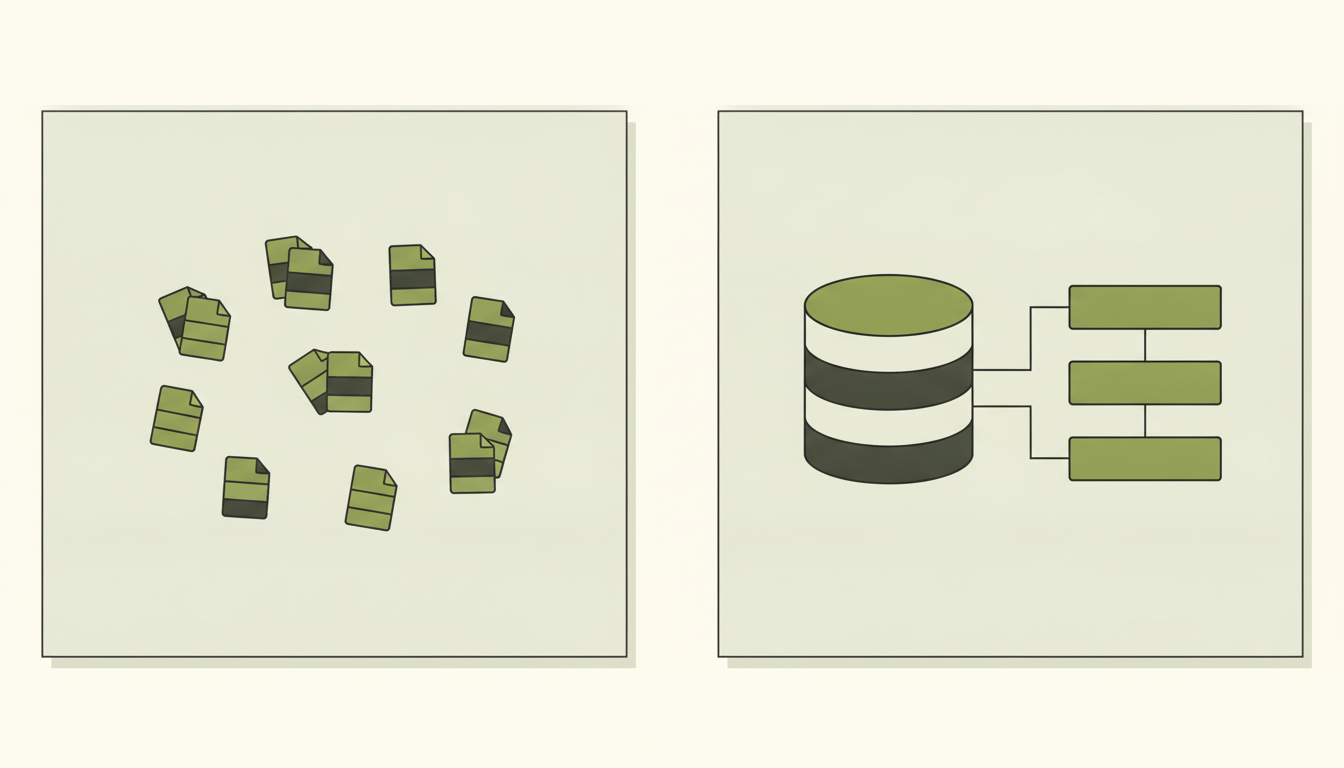
Shapefiles on the left, each layer stored as its own set of files. A geodatabase on the right, holding the same layers together as linked tables.
If the terms in this post are new, What is GIS? and vector vs raster cover the basics first.
Where most GIS data starts: the shapefile
The shapefile is still the format people most often send each other. Despite the name, a shapefile is a set of related files that have to travel together, one holding the shapes, another the attribute table and others the index and coordinate system, and together they hold a single layer.1 Lose one of the files in an email or a copy and the layer stops opening properly.
Its limits are well documented. Each component file is capped at 2 GB, field names cannot be longer than 10 characters, null values are not supported, and date fields hold a date but not a time.2 The 10-character limit is why so many datasets end up with fields called OWNR_NM_2 and a separate document explaining what they mean. Esri also describes the shapefile as nontopological, meaning each shape is stored on its own with no record of how it relates to its neighbours, and recommends importing shapefiles into a geodatabase for that kind of editing.1
None of this matters much to one analyst on a one-off project. It matters once the folder has become, without anyone deciding it, the organisation’s only record of where its sites, assets or land interests are.
The middle step: GeoPackage
A GeoPackage removes most of those limits. It is a single SQLite database file that can hold many layers along with their metadata,3 so the folder of forty shapefiles can become one file with forty tables inside it, and field names can say what they mean.
In a narrow sense, a GeoPackage is already a small database. The catch is the SQLite engine underneath, which allows any number of people to read a file at once but only one to write to it at a time, and whose authors advise against using it where the same file is opened directly from many computers over a network.4 A GeoPackage on a shared drive, edited by four people, is exactly that situation. It is a very good format for one person, and for passing data between organisations, but it was not built for a team working on the same data.
Moving into a database
The next step is a database server: one shared system that everyone connects to, rather than a file that gets copied around. In GIS this is usually called a spatial database or a geodatabase. It stores geometry as a proper data type, so each row in a table is a feature, such as a land parcel, a cable route or a borehole, with one column holding its shape and the others holding its attributes. You work with it in SQL, the standard language for relational databases, and that changes how the data behaves in several ways.
There is one copy. Everyone connects to the same tables, so nobody has to ask which file is current, and desktop GIS, dashboards and scripts all read the same data.
The data follows rules. A column can be set to accept only polygons in British National Grid, and the database can refuse any shape that is broken, such as a boundary that crosses itself. These rules have to be set up deliberately; in PostGIS, a geometry column with no coordinate system declared defaults to “unknown”, and shapes are not checked for errors on loading unless you add that check yourself.5 Getting this right at the start saves a great deal of untangling later.
Questions are fast. The database keeps a spatial index, which works much like the grid on a paper map: it records roughly where each feature sits, so a search can discard everything in the wrong area before doing any exact calculation on the few features that are left.6 A query against millions of features does not have to examine every one of them.
Several people can edit at once. PostgreSQL, the database PostGIS is built on, is designed so that reading never blocks writing and writing never blocks reading,7 which means a team can work on the same tables without locking each other out.
What a query looks like
The practical difference is that you ask the database a question instead of making a new file. Say a team holds land parcels and the line of a proposed cable route, and wants every parcel within 50 metres of it. In a folder of files, that means buffering the route, intersecting the buffer with the parcels and exporting the result, then repeating the whole process each time the route moves. In a database, it is a single question:
-- Every land parcel within 50 metres of cable route 'A'.
-- Distances are in metres because the data uses British National Grid.
SELECT p.parcel_id, p.title_no
FROM   parcels AS p
JOIN   cable_routes AS r
       ON ST_DWithin(p.geom, r.geom, 50)
WHERE  r.route_ref = 'A';
In plain English, that reads: list the ID and title number of every parcel that lies within 50 metres of route A. ST_DWithin is one of the spatial functions PostGIS adds to SQL, and it uses the spatial index to skip parcels nowhere near the route.8 When the route moves, the same question returns the new answer. Nobody has to remember which buffer file was the latest, and QGIS can display the result directly as a map layer.
PostGIS or an Esri geodatabase
The two most widely used options are PostGIS and Esri’s geodatabases. PostGIS is a free, open-source extension to PostgreSQL. Because it is an ordinary database underneath, anything that can connect to PostgreSQL can use the data: QGIS, ArcGIS Pro, Python scripts, web applications and reporting tools. That makes it a natural fit when data is shared between tools or feeds an application.
Esri’s geodatabases come in two main types. A File Geodatabase is a folder on disk; Esri describes it as supporting a single editor with multiple readers, and it does not support versioning, so in practice it sits closer to a GeoPackage than to a server.9 An Enterprise Geodatabase runs on top of a database such as Microsoft SQL Server, Oracle or PostgreSQL and is designed for many people to edit at once, with versioning that lets editors work on separate versions of the data and reconcile their changes later.9
The two overlap more than the names suggest, since an Enterprise Geodatabase can run on PostgreSQL, and QGIS can read and write File Geodatabases through the GDAL library, which gained write support in version 3.6.10 The choice usually follows the rest of the organisation. A team built around ArcGIS Enterprise, with editors relying on versioning and Esri’s editing tools, is well served by an Enterprise Geodatabase, whereas a mixed environment, or one where the data also feeds applications and scripts, tends to suit PostGIS. Our ArcGIS vs QGIS comparison covers how that wider platform decision usually gets made.
Signs it is time to move
A single analyst on a one-off project can work perfectly well from a GeoPackage, and there is no virtue in building a database nobody needs. The case for a database grows when the data outlives the project and other people start to depend on it. In practice, the signs tend to look like this:
- Two people need to edit the same layer, and changes are being merged by hand or lost.
- Filenames carry the version history, as in
sites_final_v3_EDITED.shp. - The same dataset exists in several places and nobody is sure which copy is current.
- Field names have been truncated, or nulls have been replaced with zeros or blanks that mean something different.
- Queries against a large layer take minutes, or a file is approaching the 2 GB shapefile ceiling.
- An application, dashboard or script needs to read the data, not only a desktop GIS.
What the move involves
Moving from files to a database is mostly a data problem rather than a software one. Installing PostGIS is quick, whereas deciding what the data should look like takes longer. A sensible migration starts with an inventory of what exists, who uses it and which copy is authoritative. It then settles a target structure: clear table and field names, a single coordinate system, a shape type for each table and the rules each table should enforce. Only then is data loaded, usually with GDAL’s ogr2ogr tool or the import tools in QGIS or ArcGIS Pro, followed by checks that nothing was lost or broken on the way in.
The most common mistake is treating the database as a bigger folder: every shapefile loaded as its own table, with the same truncated field names and no rules, so the structure improves on paper and nothing else changes. A missing spatial index is the usual reason a team decides the database is slow. The step most often skipped is changing how people work, so that edits go into the database and the old folder is retired; a database without a named owner and agreed editing rules drifts back into the same state as the folder it replaced. We cover the process in more detail in GIS data migration: what to expect.
Related reading
For an example at scale, our national building data platform case study describes standardising 44 million building records in PostgreSQL and PostGIS. The property GIS data review shows the earlier stage, where the job was to find out what data existed before deciding where it should live. If you would rather have someone experienced run the move, our GIS project delivery page explains how we scope that kind of work, and the Knowledge Hub collects the rest of our GIS basics series.
If you are not sure whether your data has outgrown its folder, the GIS scorecard takes a few minutes and shows where your setup is in good shape and where it is likely to cause trouble.
References
- Esri. What is a shapefile?
- Esri. Geoprocessing considerations for shapefile output.
- Open Geospatial Consortium. OGC GeoPackage Encoding Standard.
- SQLite. Appropriate uses for SQLite.
- PostGIS Project. Data management, PostGIS 3.5 manual, sections 4.4 to 4.6.
- PostGIS Project. Introduction to PostGIS: spatial indexing.
- PostgreSQL Global Development Group. Concurrency control: introduction.
- PostGIS Project. ST_DWithin reference.
- Esri. Types of geodatabases, ArcGIS Pro documentation.
- GDAL. OpenFileGDB: Esri File Geodatabase vector driver.